Devices Syslog Configuration
The capture of the device's Syslog can be logged directly to the OVOC server without the need for a third-party Syslog server in the same local network. The OVOC Server Manager is used to enable this feature.
Syslog is captured according to the device's configured Syslog parameters. For more information, see the relevant device User's manual.
The user needs to also enable the monitored device to send syslog messages to the standard syslog port (UDP 514) on the OVOC server machine.
The syslog log file 'syslog' is located in the following OVOC server directory:
/data/NBIF/mgDebug/syslog
The syslog file is automatically rotated once a week or when it reaches 100 MB. The Operating System creates up to 5 rotated zip files in the default configuration (in addition to the Main Syslog file).
| ➢ | To enable device syslog logging: |
| 1. | From the Diagnostics menu, choose Devices Syslog, and then press Enter. |
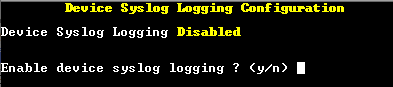
| 2. | Type y to enable device syslog logging, and then press Enter. |